60 monitoring inboxes
Run placement checks across a pool of 60 seed mailboxes instead of relying on one or two isolated tests.

Check helps you verify real inbox placement across seed accounts and major mailbox providers, so you can see whether your email lands in Inbox, Promotions, Spam, Junk, or goes missing.
Check is built to give you a practical placement signal based on real monitoring inboxes instead of a theoretical score.
Run placement checks across a pool of 60 seed mailboxes instead of relying on one or two isolated tests.
Monitor results in Gmail, Outlook, Yahoo, and iCloud to spot provider-specific placement differences.
The mailbox set covers different countries, which helps create a broader and more realistic monitoring sample.
Seed inboxes have different ages, from around 1 year to 10+ years, for a less uniform test environment.
Mailboxes are cleaned regularly to reduce accumulated content bias and personalized topical influence.
Use Check for pre-send testing and keep seed addresses inside regular campaign lists to monitor live delivery later.
Use the same sender, domain, and sending platform that you plan to use for the real campaign.
Use the same subject line, From name, sending domain, HTML, links, and tracking setup that will be used in the real send.
Copy 1 address for a quick test, Core 20 for the recommended working sample, or all 60 for a wider view.
Send through your ESP test feature or create a dedicated test list and add the CheckInbox addresses there.
Send from the real sending infrastructure so the result reflects the actual delivery path you plan to use.
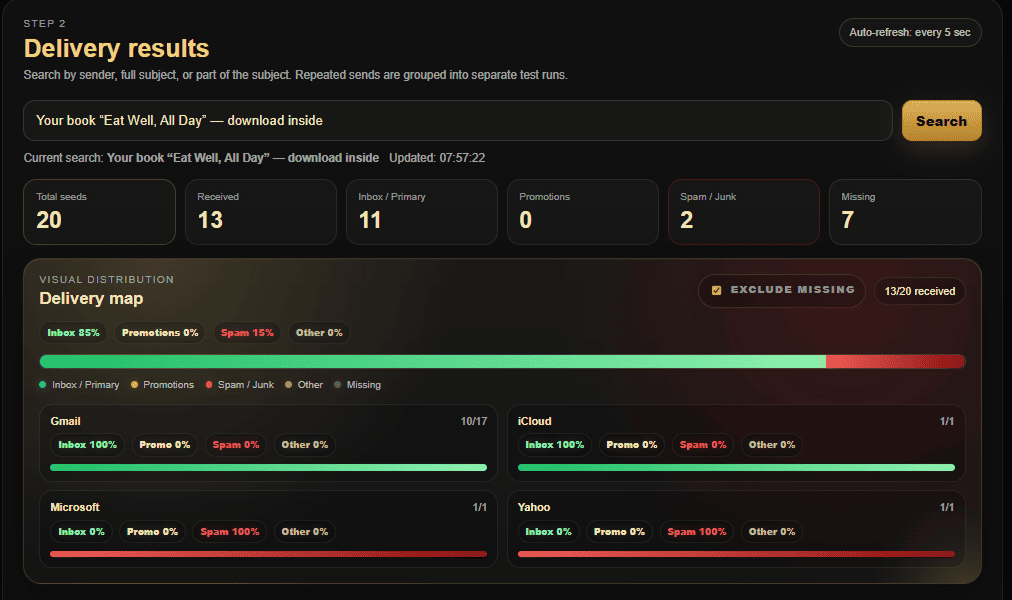
Open Check and find the send by subject or sender to review placement overall and by provider.
Check shows a high-quality placement signal, not a 100% guarantee for every real recipient. Real user inboxes may behave differently because mailbox providers also consider engagement history, sender and domain reputation, list quality, campaign volume, sending velocity, invalid contacts, and provider-specific filtering. Use Check as a practical diagnostic sample for understanding the real situation as clearly as possible.