Analyze the actual email
Scan receives the real message you send, including headers, authentication verdicts, links, HTML, and sending information instead of analyzing only pasted copy.

Send the exact email you plan to launch to a one-time Scan address and get a practical report covering authentication, sending infrastructure, blacklist signals, content, links, and other deliverability risks.
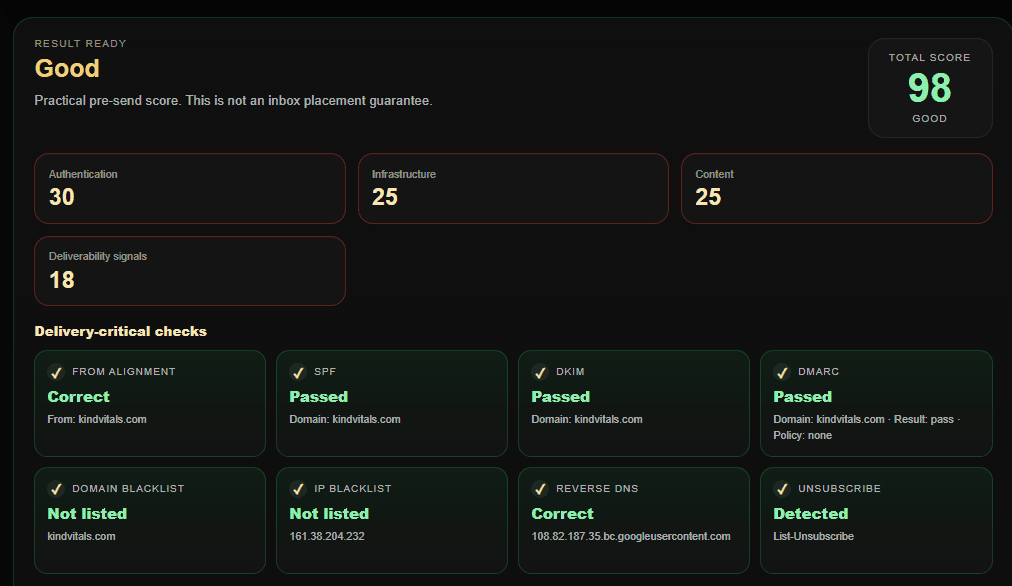
Scan analyzes a real received email sample and turns technical deliverability signals into a readable pre-send report.
Scan receives the real message you send, including headers, authentication verdicts, links, HTML, and sending information instead of analyzing only pasted copy.
Review received-message authentication evidence, alignment, visible From identity, and available SPF, DKIM, and DMARC verdicts in one place.
Inspect sender IP, MX and A records, PTR and reverse DNS, forward-confirmed PTR, technical sender identity, and other infrastructure signals.
Check both IP and domain blacklist layers while avoiding false hard failures from resolver-limited or inconclusive responses.
Review subject quality, aggressive wording, capitalization, HTML-to-text balance, images, tracking pixels, links, shorteners, forms, and attachments.
Get a practical score, delivery-critical status cards, findings, and recommendations designed to help operators understand what to fix first.
For the most representative result, test the final email through the same sender, domain, and sending platform you plan to use in production.
Open Scan and create a one-time address for the email you want to analyze.
Keep the real From identity, subject, HTML, links, images, tracking, and other elements that will be present in the production campaign.
Use the same sending platform, domain, and infrastructure as the real campaign so authentication and infrastructure checks reflect the actual sending path.
CheckInbox receives the message and automatically builds the deliverability report from the captured email sample.
Start with From alignment, SPF, DKIM, DMARC, IP and domain blacklists, reverse DNS, and unsubscribe signals before moving to deeper findings and recommendations.
Scan is a practical pre-send diagnostic, not a guarantee of inbox placement. A technically healthy email can still land differently for real recipients because mailbox providers also consider sender and domain reputation, engagement history, sending volume, list quality, infrastructure consistency, and provider-specific filtering. Use Scan to identify fixable risks, then use Check to measure actual placement.