Separate Spam Risk and Promo Risk
See aggressive or spam-like wording separately from highly promotional language, so you can understand what type of copy risk you are dealing with.

Word Scanner analyzes your subject line and email body for spam-risk and promo-risk wording, highlights exact risky words and phrases, and gives practical recommendations before launch.
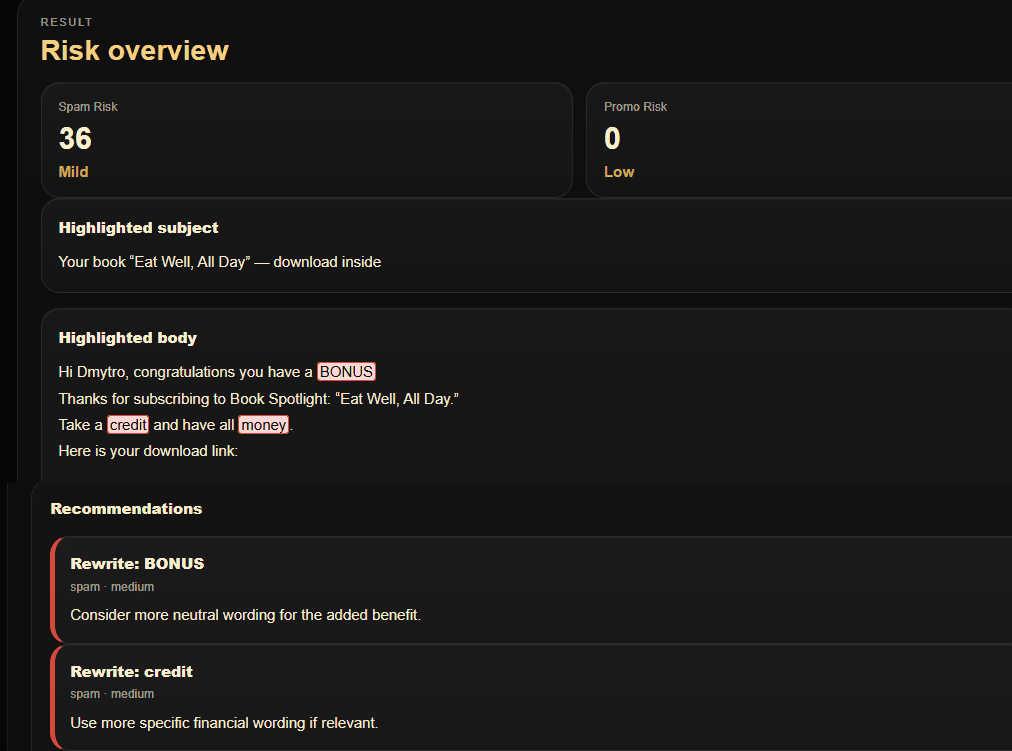
Word Scanner separates different wording risks instead of reducing everything to one generic spam score.
See aggressive or spam-like wording separately from highly promotional language, so you can understand what type of copy risk you are dealing with.
Review risky matches in the subject line and body independently, with subject-level signals treated as especially important.
The scanner matches both individual terms and multi-word phrases, helping surface risky wording patterns that simple single-keyword checks can miss.
Analyze wording in English, Ukrainian, Spanish, French, and German using language-specific dictionaries and rules.
Word Scanner also considers CAPS usage, punctuation and symbol pressure, severity, repetition, and message-length context.
Get highlighted findings and actionable recommendations that help you decide what wording to soften, rewrite, or keep.
Analyze the same subject line and body copy that you plan to use in the real campaign.
Select the language used in the email so Word Scanner applies the correct dictionary and matching rules.
Add the exact subject line you plan to send so subject-level wording risk can be evaluated separately.
Add the campaign body copy you want to review, including the wording and promotional language planned for launch.
Word Scanner calculates Spam Risk and Promo Risk and highlights the words, phrases, and wording signals that affected the result.
Start with the strongest findings and subject-line risks, revise the copy where needed, and run the analysis again.
Word Scanner is a wording-risk diagnostic, not a mailbox-provider spam filter and not a guarantee of inbox placement. A Low-risk message can still land in Spam because delivery also depends on sender and domain reputation, authentication, sending volume, list quality, recipient engagement, infrastructure, and provider-specific filtering.